Built by Mecandria · Healthcare

Mecandria HMS One system for the whole hospital.

A hospital management system white-labelled with your hospital’s name. Front desk, doctors, pharmacy, laboratory and accounts work from the same patient record, and administrators see the day at a glance.

15
modules
5
core modules in every plan
1
shared patient record
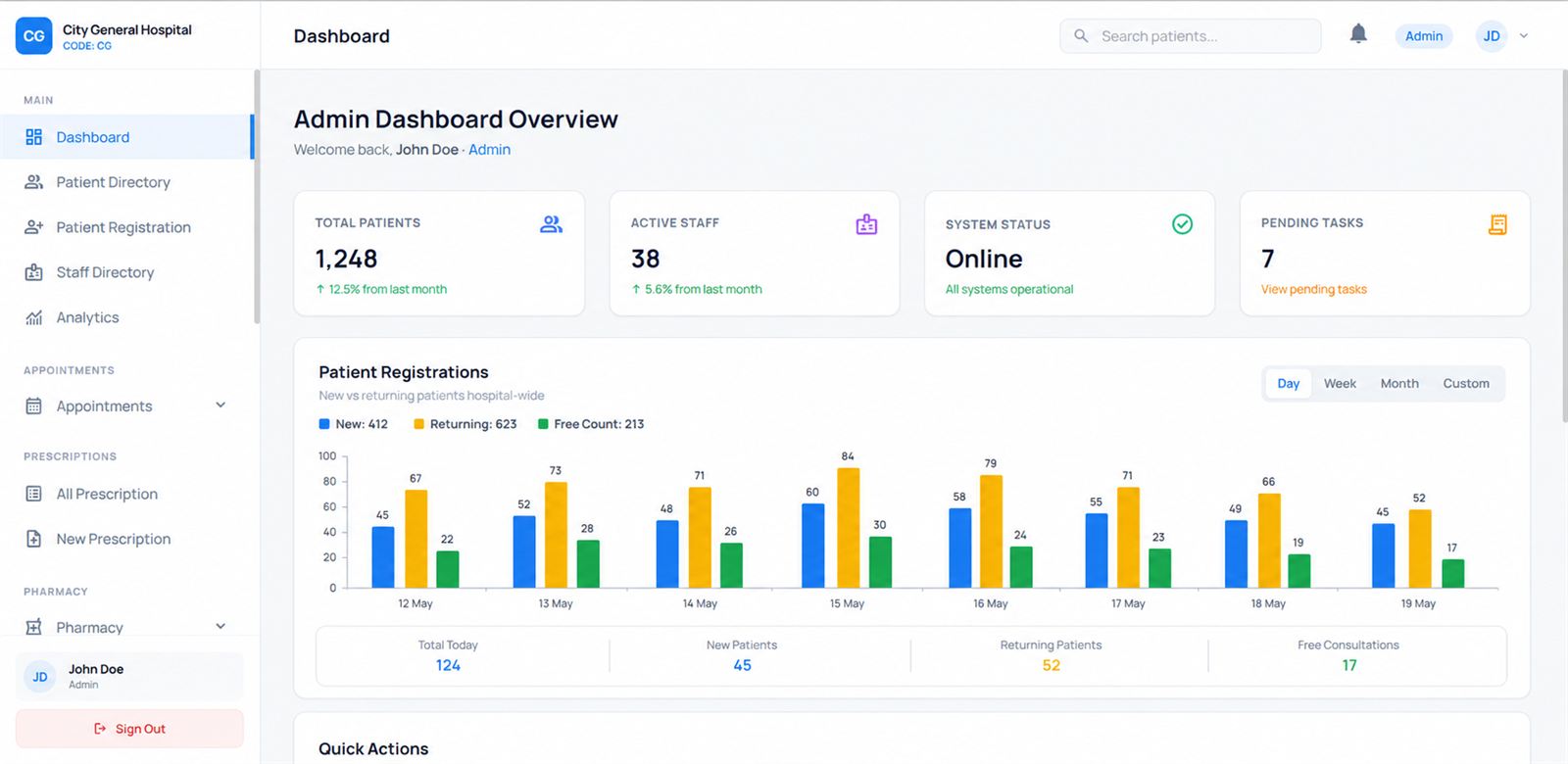
Mecandria HMS admin dashboard white-labelled for a hospital, showing total patients, active staff, system status, pending tasks and a patient-registrations chart split into new, returning and free consultations.
A patient’s visit

One record, from the front desk to the bill.

Every step of a visit happens in the same system, so nothing is typed twice and nobody has to ask another department what happened.

  1. RegisterPatient Management
  2. BookAppointments
  3. ConsultDoctors & Prescriptions
  4. TestLaboratory
  5. DispensePharmacy & Optical Store
  6. PayBilling & Insurance
The modules

15 modules. Use the ones you need.

Five core modules come with every plan. Clinical, financial and operations modules are added to suit your hospital, and more can be switched on as you grow.

Authentication

CoreIncluded in every plan

Secure sign-in for everyone who uses the system. Each staff member gets their own login and a role, so the front desk, doctors, pharmacy and administrators each see the screens that belong to their work.

What it handles

  • Individual logins for every staff member
  • Roles such as admin, front desk, doctor and pharmacist
  • Access to patient information only for the right roles
  • Password-protected access from any web browser

Works with

Hospital ProfileAttendanceAnalytics

Hospital Profile

CoreIncluded in every plan

The hospital’s own identity inside the system. Mecandria HMS is white-labelled, so staff and patients see your hospital’s name and logo, not ours.

What it handles

  • Hospital name and logo across the system
  • Address and contact details in one place
  • Details that appear on printed documents
  • One profile kept up to date by the administrator

Works with

AuthenticationPrescriptionsBilling

Patient Management

CoreIncluded in every plan

Register a patient once and keep their record in one place. The patient directory lets any authorised staff member find a patient quickly and see their history with the hospital.

What it handles

  • Patient registration at the front desk
  • A searchable patient directory
  • One record that follows the patient through every visit
  • New, returning and free-consultation visits told apart

Works with

AppointmentsPrescriptionsBillingInsurance

Doctor Management

CoreIncluded in every plan

Keep every doctor’s details, department and availability in one list, so appointments are booked with the right doctor at the right time.

What it handles

  • Doctor profiles and departments
  • Consultation availability for booking
  • Each doctor’s own list of patients for the day
  • Links between doctors, appointments and prescriptions

Works with

AppointmentsPrescriptionsAttendance

Appointments

CoreIncluded in every plan

Book, view and manage appointments without an appointment book. The front desk sees the day at a glance, and patients can be reminded about their visit on WhatsApp.

What it handles

  • Online and front-desk booking
  • Upcoming appointments by day and by doctor
  • WhatsApp reminders so patients don’t miss visits
  • A clear queue for the front desk

Works with

Patient ManagementDoctor ManagementBilling

Prescriptions

ClinicalAdd-on module

Doctors write prescriptions digitally, straight into the patient’s record. No handwriting to decipher, and the pharmacy and optical store work from the same prescription.

What it handles

  • Digital prescriptions in the patient record
  • Printable prescriptions with the hospital’s details
  • Past prescriptions visible at the next visit
  • Prescriptions passed on to pharmacy, optical store and laboratory

Works with

Patient ManagementDoctor ManagementPharmacyOptical StoreLaboratory

Pharmacy

ClinicalAdd-on module

The pharmacy dispenses from the doctor’s prescription instead of a separate paper record, and keeps track of the medicines it holds.

What it handles

  • Dispensing from the prescription
  • Medicine stock levels
  • Pharmacy sales linked to the patient
  • One record shared with doctors

Works with

PrescriptionsInventoryBilling

Optical Store

ClinicalAdd-on module

Made for eye hospitals and clinics. Spectacle and lens orders come straight from the eye prescription, and the store keeps track of frames and lenses.

What it handles

  • Spectacle and lens orders from the prescription
  • Frames and lenses stock
  • Optical sales linked to the patient
  • Order status from order to delivery

Works with

PrescriptionsInventoryBilling

Laboratory

ClinicalAdd-on module

Tests ordered during a consultation reach the laboratory directly, and results go back into the patient’s record for the doctor to review.

What it handles

  • Test requests from the consultation
  • Result entry by laboratory staff
  • Reports saved to the patient record
  • Pending tests visible at a glance

Works with

PrescriptionsPatient ManagementBilling

Billing

FinancialAdd-on module

Medical billing for consultations, procedures, pharmacy and other services, built from what actually happened during the visit.

What it handles

  • Bills for consultations and services
  • Receipts for patients
  • Payments recorded against the patient
  • Daily collection totals

Works with

Patient ManagementPharmacyInsuranceAnalytics

Insurance

FinancialAdd-on module

Keep each patient’s insurance details with their record and follow insured treatments through billing.

What it handles

  • Insurance details on the patient record
  • Insured and self-pay visits told apart
  • Claim status tracking
  • Insurance amounts linked to the bill

Works with

Patient ManagementBilling

General Billing

FinancialAdd-on module

Billing for items and services outside a patient consultation, so every payment the hospital takes is recorded in one system.

What it handles

  • Bills for walk-in sales and other services
  • The same receipts and payment records as Billing
  • Totals included in daily collections
  • No separate cash book

Works with

BillingAnalytics

Inventory

InventoryAdd-on module

Track the hospital’s stock and supplies in one place, so items are reordered before they run out.

What it handles

  • Stock levels for medicines, consumables and supplies
  • Low-stock alerts
  • Stock movements recorded as they happen
  • Shared with the pharmacy and optical store

Works with

PharmacyOptical StoreAnalytics

Analytics

AnalyticsAdd-on module

The dashboard administrators open first. It shows how the hospital is doing today, without anyone compiling a report.

What it handles

  • Total patients and active staff
  • Patient registrations: new, returning and free consultations
  • Pending tasks and system status
  • Trends over time

Works with

Patient ManagementAppointmentsBillingAttendance

Attendance

HRAdd-on module

Record staff attendance in the same system the team already uses every day.

What it handles

  • Daily staff attendance
  • Attendance history for each staff member
  • Staff activity for administrators
  • Linked to staff logins and roles

Works with

AuthenticationDoctor ManagementAnalytics

Your setup

Pick the modules your hospital needs.

This is the same module list the HMS administrator uses for a hospital’s plan. Untick what you don’t need and we’ll show you that setup in the walkthrough.

15 of 15 modules selected

Request a walkthrough
Included modules

What a hospital says

In use

“Mecandria HMS has made our hospital operations more organised and easier to manage. It securely handles patient information, online and upcoming appointments, prescriptions and medical billing in one place. The WhatsApp reminder feature also helps us keep patients informed about their appointments.”

Balaji Eye FoundationRead client stories
Running a hospital or clinic?

See Mecandria HMS with your hospital’s name on it.

Tell us how your hospital works today. We’ll walk you through the modules that fit and set them up around your workflow.