Built by Mecandria · Business systems

Mecandria ERP One system for the whole business.

A modular business management system for trading, distribution and operations-led businesses. Purchase, stock, sales and accounts work from the same data, and owners see what needs attention today.

12
modules
1
shared set of masters
1
dashboard for the day
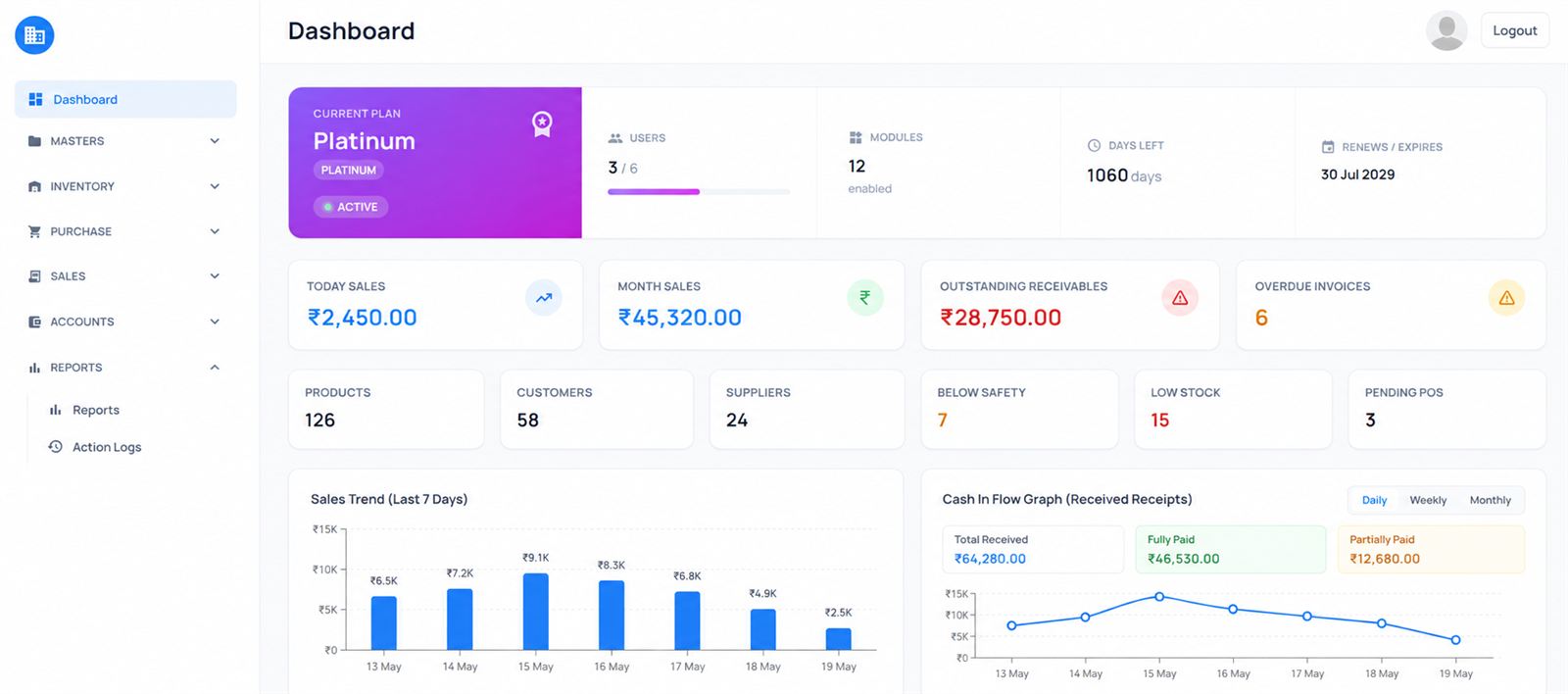
Mecandria ERP dashboard showing the current plan, today's and this month's sales, outstanding receivables, overdue invoices, stock alerts, a seven-day sales trend and a cash-in-flow graph.
From supplier to cash

One flow, from purchase to profit.

Goods come in, go out and turn into money in the same system, so nothing is typed twice and nobody keeps a separate notebook.

  1. Set upMasters
  2. BuyPurchase
  3. StockInventory
  4. SellSales & Point of Sale
  5. CollectAccounts
  6. ReviewDashboard & Reports
The modules

12 modules. Use the ones you need.

Every module is switched on or off from one list, so a shop counter, a distributor and a service business each run only what fits their work.

Dashboard

FoundationSwitch on as needed

The screen owners open first. Today’s sales, outstanding receivables, overdue invoices and stock alerts sit on one page, so nobody has to compile a report to know how the business is doing.

What it handles

  • Today’s and this month’s sales
  • Outstanding receivables and overdue invoices
  • Stock alerts and pending purchase orders
  • Seven-day sales trend and cash inflow

Works with

SalesAccountsInventoryPurchase

Masters

FoundationSwitch on as needed

Set the business up once: items, customers, suppliers and the other lists every module works from. Change a price or an address in one place and every module uses the new one.

What it handles

  • Items with units and prices
  • Customers and suppliers
  • Business details printed on invoices
  • One shared list for every module

Works with

PurchaseSalesInventoryPoint of Sale

Purchase

Buy & stockSwitch on as needed

Record what you buy from suppliers, from the purchase order to the bill. Goods received go into stock, and what you owe goes to Accounts.

What it handles

  • Purchase orders to suppliers
  • Pending orders tracked until received
  • Received goods added to stock
  • Supplier bills and payables

Works with

MastersInventoryAccounts

Inventory

Buy & stockSwitch on as needed

Know what is in stock without counting shelves. Every purchase, sale and adjustment moves stock as it happens.

What it handles

  • Live stock levels for every item
  • Stock alerts before items run out
  • Every stock movement recorded
  • Shared by Purchase, Sales and Point of Sale

Works with

PurchaseSalesPoint of SaleReports

Sales

SellSwitch on as needed

Invoice customers from the same item list. Each invoice reduces stock and adds to what the customer owes, so billing and accounts never drift apart.

What it handles

  • Sales invoices for customers
  • Cash and credit sales
  • Stock reduced as you invoice
  • Receivables tracked for each customer

Works with

MastersInventoryAccountsDashboard

Point of Sale

SellSwitch on as needed

Quick billing at the counter for walk-in customers. Pick the items, take payment and print the bill, while stock and accounts update in the background.

What it handles

  • Fast counter bills
  • Payment recorded with the bill
  • Printed bills with your business details
  • Counter sales included in daily totals

Works with

MastersInventoryAccounts

Service Invoice

SellSwitch on as needed

Bill for work as well as goods. Repairs, installation, maintenance and other services are invoiced in the same system as product sales.

What it handles

  • Invoices for services and labour
  • The same customer list as Sales
  • Service income posted to Accounts
  • Service and product revenue side by side

Works with

MastersAccountsReports

Accounts

Money & controlSwitch on as needed

Money in and money out, posted from the transactions that already happened. Sales, purchases and payments reach Accounts without anyone typing them again.

What it handles

  • Receivables and payables
  • Payments received and made
  • Overdue invoices highlighted
  • Cash inflow at a glance

Works with

SalesPurchaseDashboardReports

Reports

Money & controlSwitch on as needed

Answers without building a spreadsheet. Sales, purchase, stock and account reports are drawn from the live data.

What it handles

  • Sales and purchase reports
  • Stock reports
  • Customer and supplier balances
  • Any date range you choose

Works with

DashboardAccountsData Export

Audit Logs

Money & controlSwitch on as needed

A record of who did what, and when. Changes are logged against the user who made them, so mistakes can be traced and nothing changes silently.

What it handles

  • Actions logged against each user
  • Date and time on every entry
  • Edits and deletions traceable
  • Visible to administrators

Works with

HRReports

Data Export

Money & controlSwitch on as needed

Take your data out when you need it, for your accountant, an audit or your own analysis.

What it handles

  • Lists and reports exported
  • Spreadsheet-ready files
  • Easy hand-over to your accountant
  • Your data stays yours

Works with

ReportsAccounts

HR

PeopleSwitch on as needed

Keep staff records in the same system that runs the business, so the people behind every transaction are on record too.

What it handles

  • Employee records in one place
  • Staff attendance
  • Staff history for administrators
  • Linked to Audit Logs

Works with

Audit LogsDashboard

Try it

Record one sale. Watch four modules move.

Pick an item, choose a quantity and save the invoice. Stock, accounts, the dashboard and the audit log update together, the way they do in Mecandria ERP. Sample data only.

Item
Payment
Invoice total₹0

Inventory

Stock

    Accounts

    Today
    Cash received
    ₹0
    Receivables
    ₹0

    Dashboard

    Today
    Today’s sales
    ₹0
    Invoices
    0
    Stock alerts
    0

    Audit Logs

    Latest
      Your setup

      Pick the modules your business needs.

      This is the same module list the ERP administrator uses to switch modules on. Untick what you don’t need and we’ll show you that setup in the walkthrough.

      12 of 12 modules enabled

      Request a walkthrough
      Included modules

      What a client says

      In use

      “Mecandria simplified our business operations with a practical ERP solution. The system has made our day-to-day billing and processing more organised and easier to manage. More importantly, it helps us analyse our cash inflow and keep better track of our accounts.”

      Yes Yes Pharma and Herba CureRead client stories
      Running a trading or distribution business?

      See Mecandria ERP set up for your business.

      Tell us how your business runs today. We’ll walk you through the modules that fit and set them up around your workflow.